ChatRelay: moving Claude Code and Codex chats between PCs without losing a message
Case study · October 30, 2026 · 7 min read
My AI coding chats stayed on the office PC, and copying them by hand left the assistant pointing at paths that did not exist at home. So I built a desktop app that syncs them, rewrites every path, and never loses a message.
I write most of my code with an AI assistant now: Claude Code in VS Code and the terminal, and OpenAI's Codex next to it. Those conversations are worth a lot. They hold every decision, every dead end, every "why did we do it this way". And they stay on the PC where they happened.
I work on two machines, an office desktop and a laptop at home. Every evening I opened the laptop and the assistant had no idea what we had done all day. Copying the chat files by hand did not help either: the assistant then opened the conversation, saw paths like C:\Users\office\shop\src\cart.tsx, and started working on files that did not exist on this PC.
So I built ChatRelay: a desktop app that moves AI coding chats between PCs, rewrites every path on the way, and never loses a message. It started as "Claude Sync" and was renamed once it supported more than one AI tool.
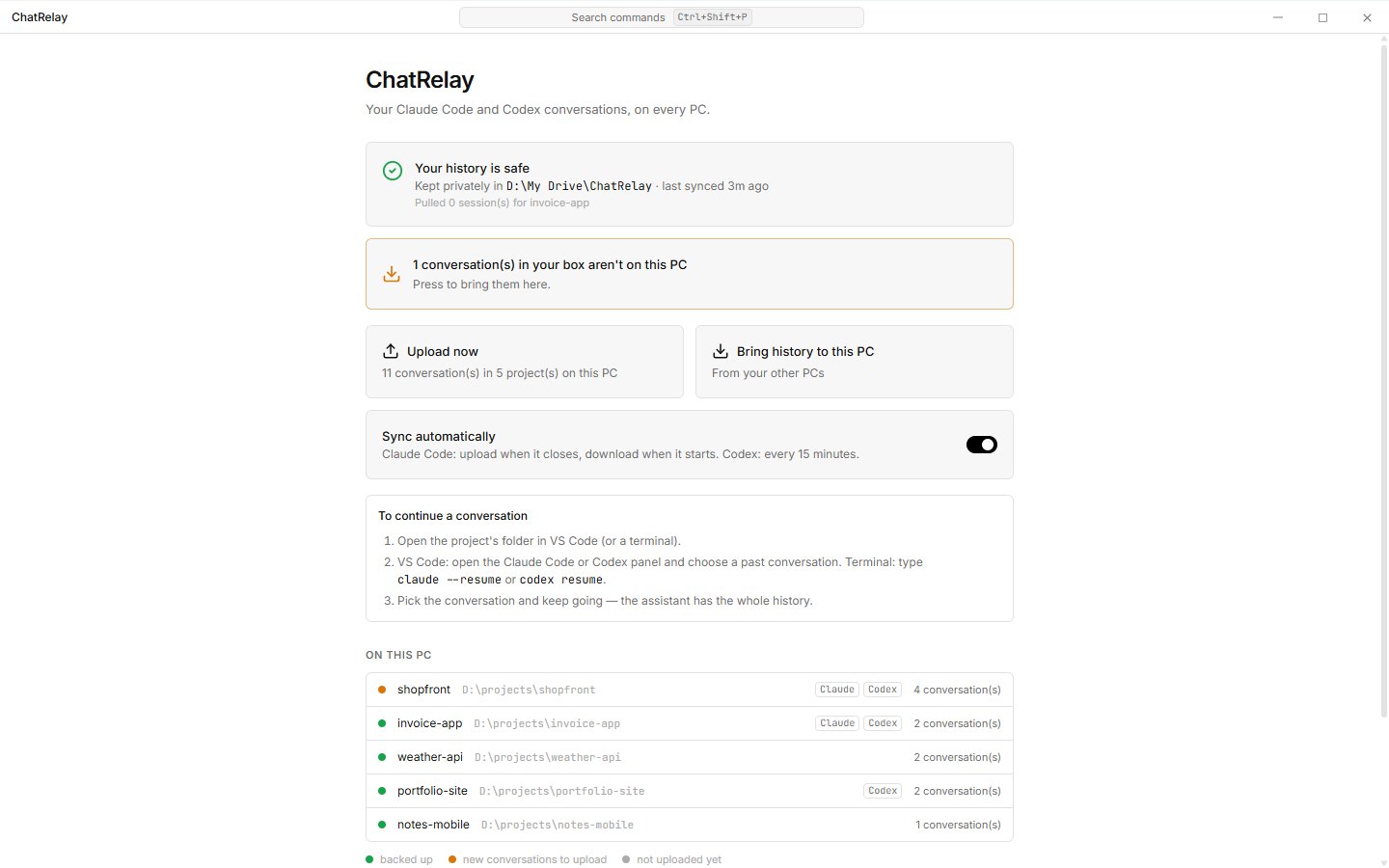
!ChatRelay's simple view: status, upload, bring history, auto-sync and every project with its tools
Where the chats actually live
Neither tool documents its storage, so the first job was reading the files on a real machine.
Claude Code keeps one JSONL file per conversation in ~/.claude/projects/<encoded-folder>/. A few things surprised me:
- The VS Code extension writes the drive letter as
c:\, the terminal asC:\, and one session can contain both. On Windows every path comparison has to ignore case. - The folder name is the project path with every symbol turned into
-, somy projectandmy-projectend up in the same folder. The real path has to come from thecwdrecorded inside the sessions. - Sessions get big. 200 MB files with embedded screenshots are normal, so everything is streamed and the scan is cached by size and modification time. A rescan takes about 100 ms.
Codex is a different world. Each conversation is a "rollout" file under ~/.codex/sessions/YYYY/MM/DD/, and some versions compress it with zstd. But copying the file is not enough: Codex lists conversations from a SQLite database (state_5.sqlite, table threads) and only scans the folder once. A conversation without a row in that table simply does not exist for Codex. Newer versions also keep "paginated" history in a second database; I found out the hard way that a paginated rollout listed as legacy will not open, and that Codex rebuilds the pages itself on first open if the row says paginated.
Each tool is now an adapter behind one interface: detect the tool and its format, list sessions, read a session into a tool-neutral shape, export it losslessly, and import it on another PC. If an adapter sees a database version or a required column it does not know, it keeps reading but turns writing off and says why. It never guesses.
Rewriting every path
A chat is full of paths: the working folder, every tool call, every file it read or wrote, links in the text. ChatRelay parses every line as JSON and rewrites string values and object keys, so escaping is never a problem. It handles C:\…, c:/…, Git Bash /c/…, WSL /mnt/c/…, macOS and Linux paths, and file:/// links with %20 for spaces. It also knows that Codex on Windows stores folders as \\?\D:\project and only adds that prefix where Codex expects it. Sibling folders like shop-old are never touched.
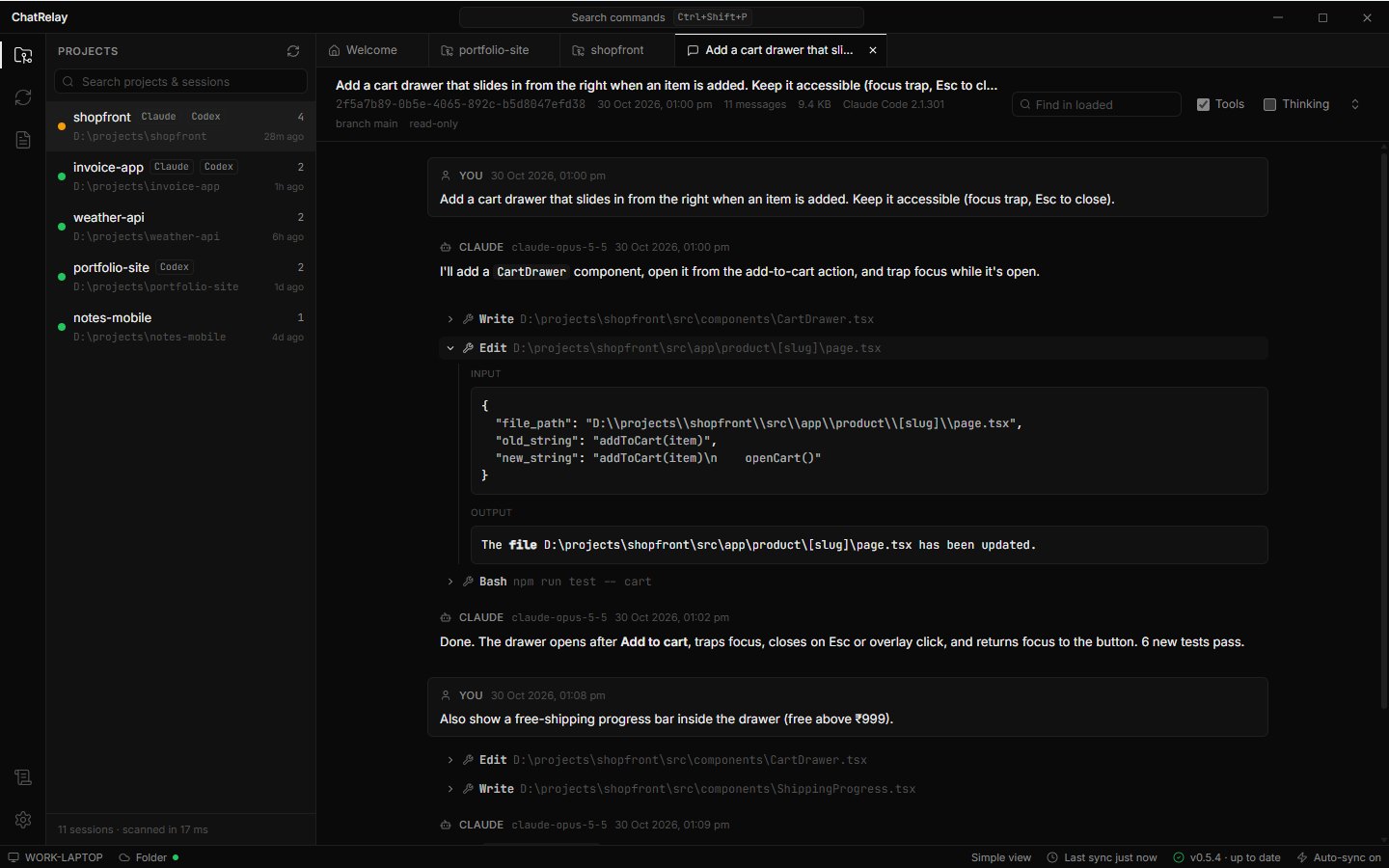
!A Claude Code conversation in ChatRelay, with tool calls and their inputs
Sending only what changed
The first version uploaded a whole conversation every time it changed. With 100 MB sessions that was slow on home internet. But AI tools only ever append to a conversation, so after the first upload ChatRelay stores just the new lines as a small "delta" part. Each part records the paths of the PC that wrote it, and the session hash is chained (hash = sha256(previous : sha256(part))), so a PC can tell exactly which parts it is missing and download only those. After 40 parts the next upload sends the whole session again to keep things tidy.
Never losing a message
This was the rule from day one, and it shaped everything:
- Uploading only reads. Your original files are never modified.
- Every write is backed up first, including Claude Code's
settings.jsonand Codex's databases with their-waland-shmfiles. One click restores a backup. - Every import starts with a dry run that shows each file and each path change, like
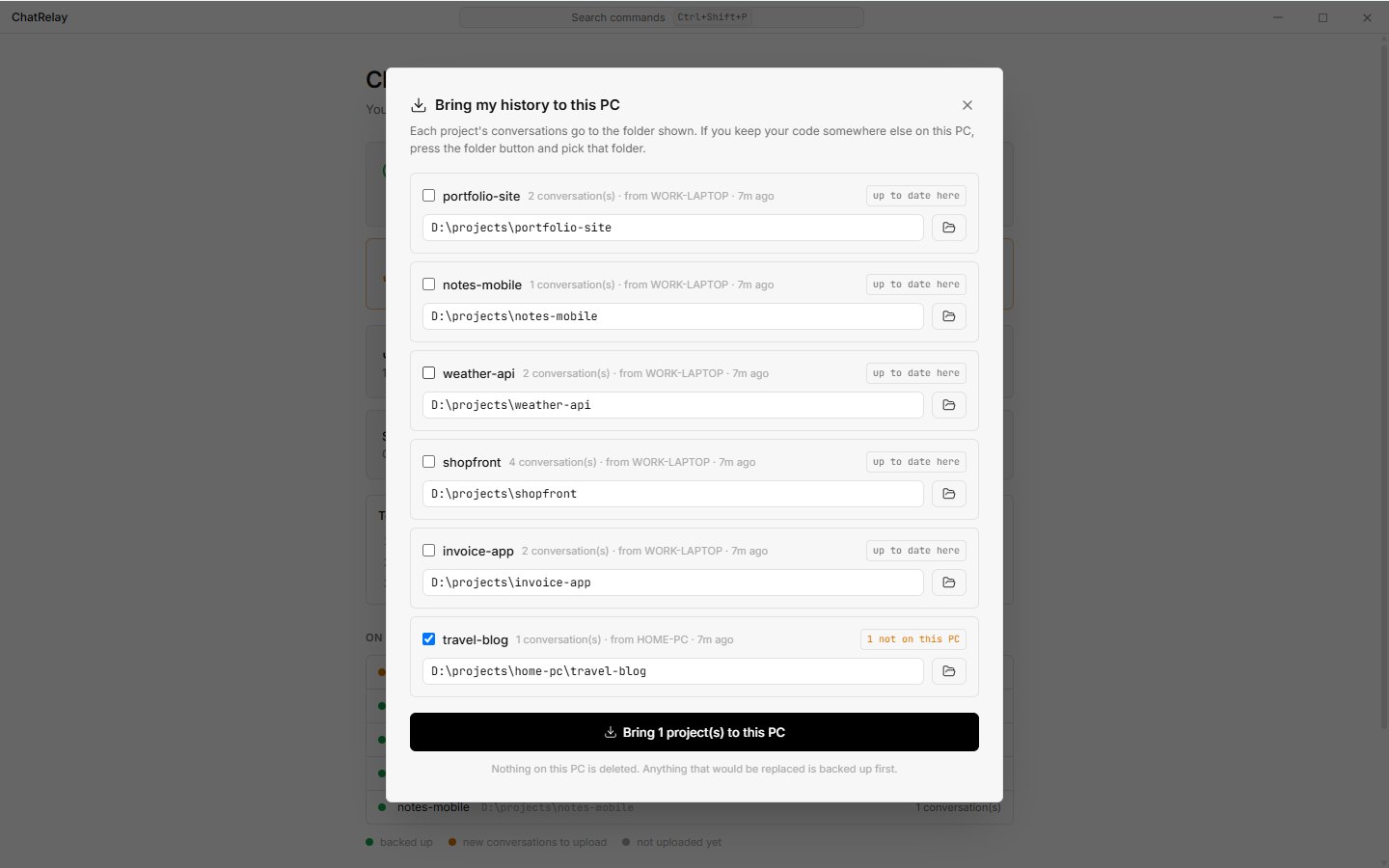
×166 C:\Users\office\shop → D:\work\shop. - Nothing is written while the tool is running. ChatRelay checks for Codex processes and waits.
- If both PCs changed the same conversation, both versions are kept. Yours stays as it is, the other one is saved as a new conversation named "(from OFFICE-PC)", and both show up in the tool.
Storage you own
There is no ChatRelay server. History goes to a folder you already sync (Google Drive, OneDrive, Dropbox, a NAS) or to a private GitHub repository. On GitHub each upload is one commit made through the Git Data API, and files over 40 MB are split into parts because GitHub refuses single files over 100 MB. Public repositories are refused outright.
!The Sync view: backend, auto-sync and every project in the backend with the PCs that pushed it
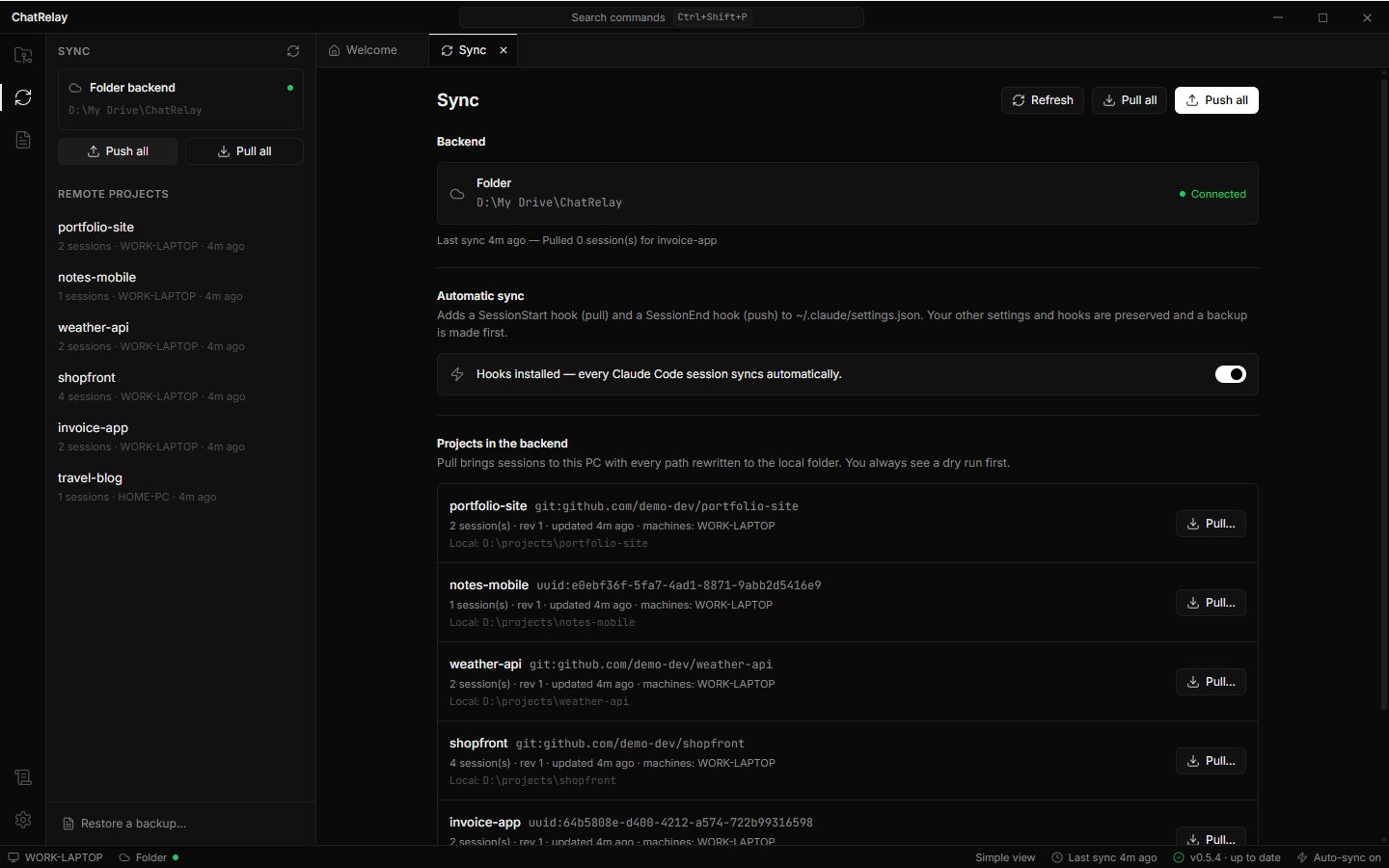
Sync can run by itself. For Claude Code, ChatRelay adds two hooks to Claude's settings: pull when a session starts, push when it ends. The hooks always exit successfully, so a network problem can never break a session. Codex has no such hook, so the desktop app checks every 15 minutes in the background.
Summaries, without leaking secrets
Sometimes you do not want the whole history, just the handoff: what is done, what was decided, what is broken, what is next. ChatRelay condenses a project's chats from every tool and asks a model to write a HANDOFF.md. It can also put a short version into the file the next tool reads as instructions: CLAUDE.md, AGENTS.md or GEMINI.md. That is how you continue a Codex project in Claude Code, or the other way round.
Chats are full of secrets, though: API keys pasted while debugging, .env lines, database URLs with passwords. So before anything leaves the PC, a scanner replaces keys, tokens and passwords with [REDACTED:kind]. That step is always on. And because pattern matching can miss a password typed in plain words, the app says so honestly and asks before sending:
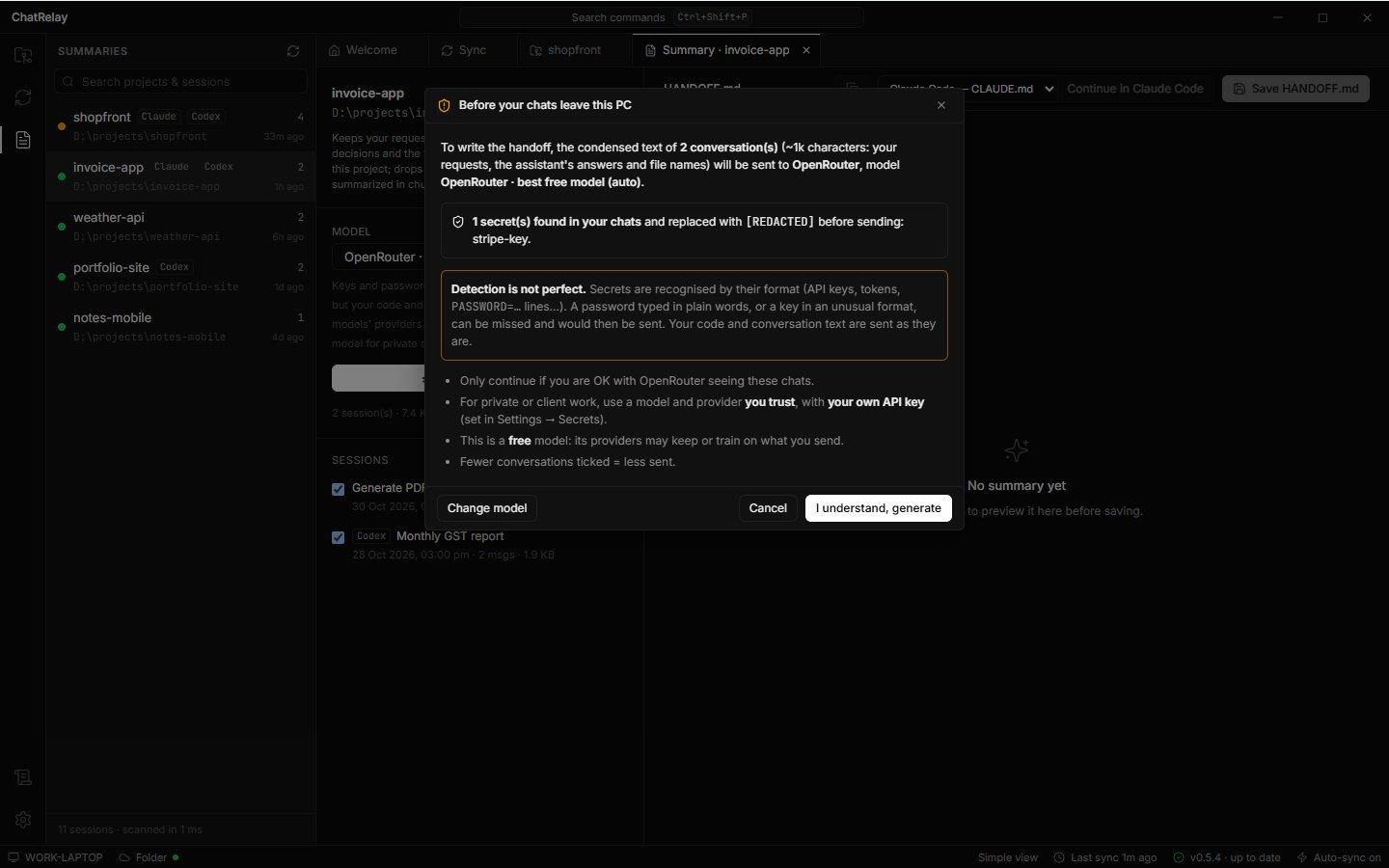
Summaries work with Claude models or through OpenRouter, including its free models.
From Electron to Rust
The first version was Electron and TypeScript. It worked, but the installer was big and the sync engine and the CLI were separate pieces. I rewrote the engine in Rust as one library that runs everywhere:
- The desktop app is Tauri around that library, with a React UI in a black-and-white, VS Code-style look: a simple view for everyday use and an advanced view with tabs, a sidebar and a command palette.
- The CLI (
claude-sync) is the same library. It is what the Claude Code hooks run, and it can do everything the app does. - The web viewer is the same library compiled to WebAssembly, so the browser shows exactly what the desktop app shows. It reads your private GitHub repository with your own token and talks to nothing but
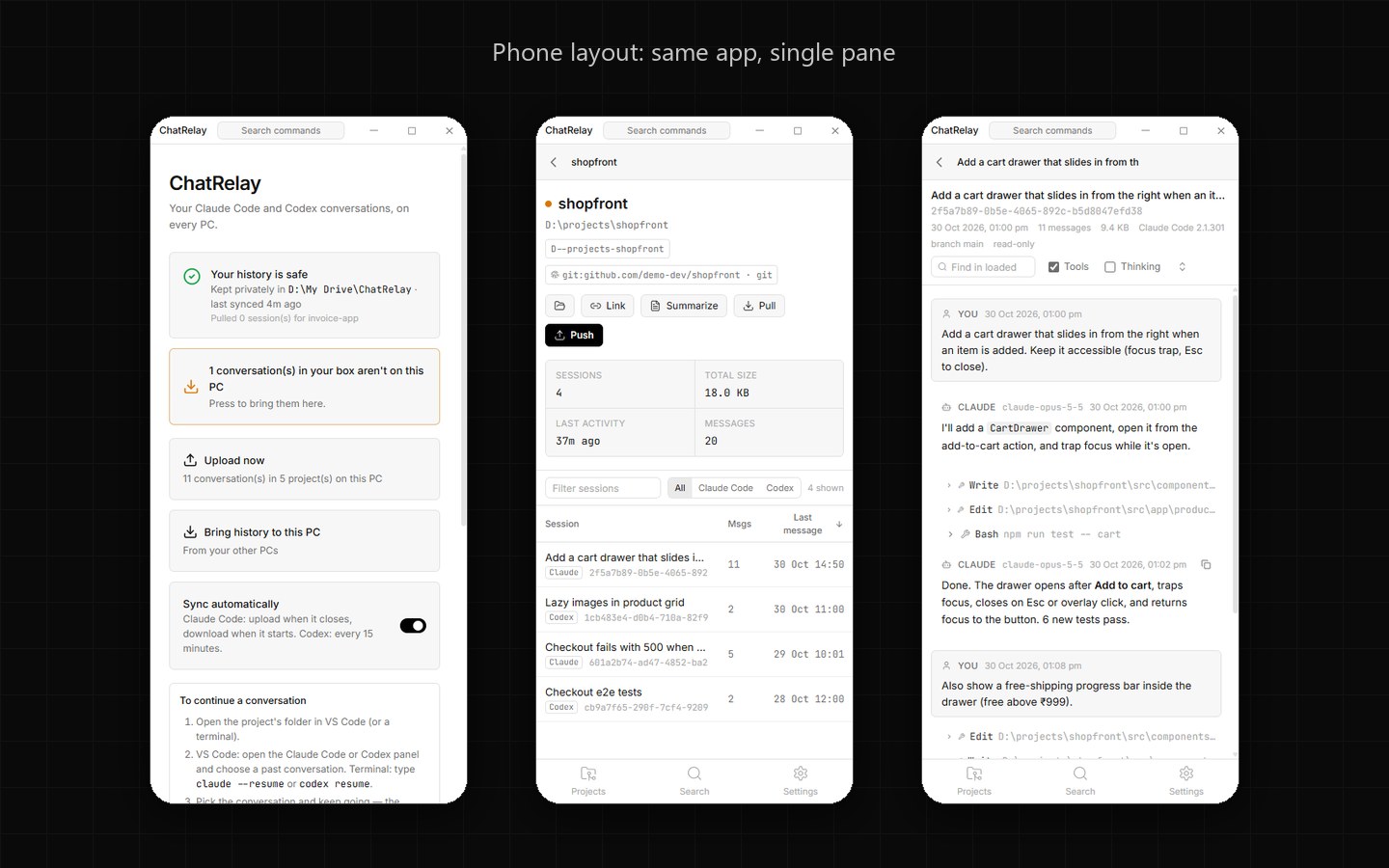
api.github.com. - The Android app is the web viewer in a Tauri shell, for reading your chats on the phone.
!The same app at phone width: single pane, bottom bar
Updates are signed: the app checks for a new version when it starts, every hour and when you come back to it, downloads it, verifies the signature and restarts. The documentation is written in ten languages, because the people who use AI coding tools are everywhere.
What I learned
- Read the real files before writing code. Every assumption I had about both tools' storage was wrong in at least one detail.
- Make the safe path the only path. Backups, dry runs and "keep both" are not options in ChatRelay; they are how it works. That is what lets me trust it with my own history.
- Be honest in the UI. "Detection is not perfect" is a better sentence than a green checkmark that lies.
ChatRelay is free for Windows, with an Android viewer, on the releases page. If you need a tool like this built for your team, a desktop app, an AI integration or a sync engine, get in touch.
Tags: Rust, Tauri, Claude Code, Codex, WebAssembly, developer tools